


A9PLAY – Player Registration Form for Malaysia
What You Need Before Registering A9PLAY
Valid Malaysia Mobile Number (+60)
A9PLAY requires a working Malaysia number starting with +60. This number will receive OTP via OTPq app or WhatsApp. Same number must be verified inside OTPq before registration.
Real Full Name (Exactly as ID)
A9PLAY uses your real name for withdrawals verify. Nicknames or shortened names will cause withdrawal rejection. Enter exactly as shown on your Malaysia ID.
Password with Minimum 6 Characters
A9PLAY enforces password minimum length is 6 characters. Use letters and numbers for better security. Password and confirmation must match exactly.
Step-by-Step A9PLAY Registration Guide
Step 1 – Download OTPq App
Where to download OTPq for A9PLAY
A9PLAY uses OTPq instead of traditional SMS. Download from Google PlayStore, Huawei AppGallery, or Apple AppStore. Search "OTPq" and install.
Verify your number inside OTPq
Open OTPq and verify your +60 Malaysia number via WhatsApp. This step is mandatory. Without OTPq verification, A9PLAY cannot send you the OTP code.
Step 2 – Fill in A9PLAY Registration Form
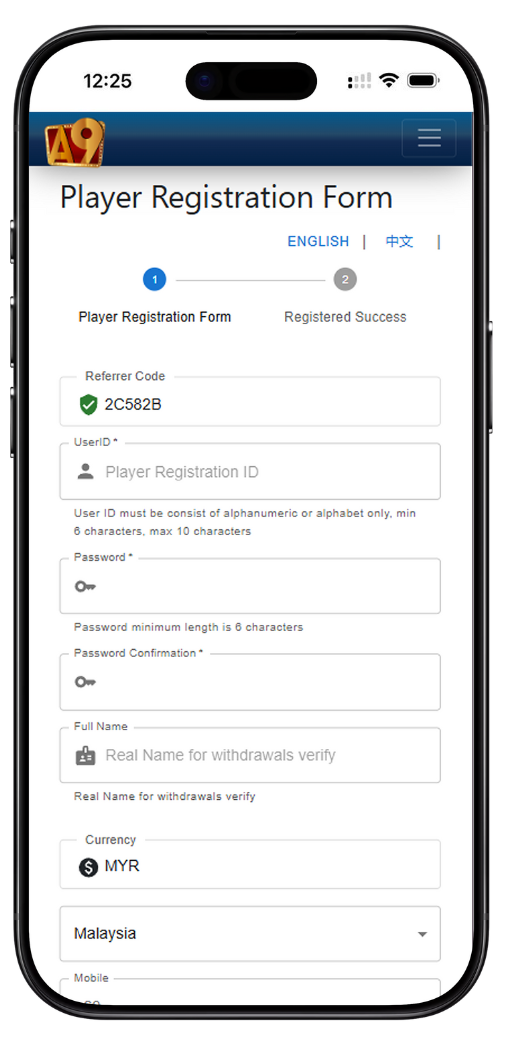
Referrer Code field
Enter referrer code 2C582B if you have one. This links your A9PLAY account to the correct onboarding path.
UserID and Password fields
Choose a unique UserID for logging into A9PLAY. Then create a password (minimum 6 characters) and confirm it. A9PLAY shows "Password minimum length is 6 characters" as a hint.
Full Name field (Critical)
This is labeled "Real Name for withdrawals verify" on the A9PLAY form. Enter your legal full name. This cannot be changed later.
Currency and Mobile fields
Currency defaults to MYR for Malaysia players. Mobile selects +60 automatically. Enter the same number you verified in OTPq.
Step 3 – Request OTP from A9PLAY
Choose your request method
A9PLAY offers three methods: OTPq (APP), WhatsApp OTP, or SMS OTP. OTPq (APP) is the most reliable. Click "Send OTP to Operator" after selecting.
Enter OTP code
Open OTPq app. You will receive a numeric OTP. Enter it into the OTP* field on the A9PLAY form. Important: once you click the edit button, you must re-request the OTP.
Step 4 – Submit A9PLAY Registration
Final review before clicking Register Now
Check all fields: UserID, password match, full name (real name for withdrawals), MYR currency, +60 mobile, and OTP. Then click REGISTER NOW button at the bottom of the A9PLAY form.
After successful registration
Your A9PLAY account is created instantly. Log in using your UserID and password. No email verification needed.
A9PLAY Registration Rules You Must Follow
Real name cannot be changed after registration
A9PLAY locks your full name after signup. This protects withdrawal security. Double-check before clicking REGISTER NOW.
One account per person
A9PLAY prohibits multiple registrations. Duplicate accounts may be suspended.
OTP expires quickly
Request OTP only when you are ready to complete the A9PLAY form. Expired OTP requires a new request.
Common A9PLAY Registration Problems (Solved)
No OTP received on OTPq
Solution: Ensure your number is verified inside OTPq via WhatsApp. Then go back to A9PLAY form and click "Send OTP to Operator" again. If still nothing, switch to WhatsApp OTP method.
"Password confirmation does not match" error
Solution: Re-type password and password confirmation carefully. A9PLAY shows "Password minimum length is 6 characters" — meet that requirement and avoid extra spaces.
Full name rejected by A9PLAY system
Solution: Remove nicknames, initials, or special characters. Use exactly: First Name + Last Name as on your Malaysia ID. Example: "Nur Aisyah Binti Abdullah" not "Aisyah".
Mobile number not accepted
Solution: Make sure you selected +60 from the dropdown. Then enter only the remaining digits (without leading zero). Example: +60 123456789 not +60123456789.
After Registering A9PLAY – Quick Start Guide
First login to A9PLAY
Use your new UserID and password. A9PLAY does not require additional email confirmation.
Deposit and play with MYR
A9PLAY supports MYR as base currency. No hidden exchange fees for Malaysia players.
First withdrawal request
A9PLAY will check your real name for withdrawals verify. If it matches your ID and bank account, withdrawal is processed quickly.
Frequently Asked Questions – A9PLAY Registration
Is A9PLAY free to register?
Yes. Registering A9PLAY costs nothing. You only deposit when you choose to play.
Can I change my full name later?
No. A9PLAY locks your real name for withdrawals verify at registration. Contact support only for legal name changes with official documents.
What if I lose access to OTPq?
Reinstall OTPq and verify the same +60 number again. Then use A9PLAY login page to request password reset or contact A9PLAY support.
Do I need the referrer code 2C582B?
Not required but recommended. Entering 2C582B on the A9PLAY registration form ensures proper tracking and may unlock future promotions.
Register A9PLAY Now – Malaysia’s Trusted Platform
Join thousands of Malaysia players on A9PLAY. Real-name withdrawal protection, MYR currency, OTPq security, and 3-minute registration. Use referrer code 2C582B. Enter your full name carefully. Complete your A9PLAY account today.
REGISTER NOW – A9PLAY OFFICIAL